

J’ai vu sur LinkedIn plusieurs personnes recommander l’utilisation du fichier llms.txt.
Mais en même temps, j’ai vu plusieurs experts qui étaient contre son utilisation. un peu perdu entre les avis des partisans et des opposants, je me suis dit qu’il fallait que je me fasse ma propre opinion et ça tombe bien puisque les plugins Rank Math et Yoast SEO ont intégré le fichier llms.txt dans leur outil.
J’ai décidé d’alterner l’utilisation des 2 extensions.
C’est quoi un fichier llms.txt ? Et surtout à quoi il sert ?
Avant de vous expliquer en détail comment j’ai procédé, je vais vous expliquer ce qu’est le fichier llms.txt et quelles sont les vertus qui lui sont attribuées.
Pour faire simple, le fichier llms.txt est un document placé à la racine d’un site web pour informer les modèles de langage, comme Gemini, ChatGPT ou Perplexity, sur les contenus qu’ils peuvent explorer et comprendre. Il fonctionnerait un peu comme un robots.txt, mais à destination des intelligences artificielles. Certains recommandent son utilisation car il serait susceptible d’améliorer la visibilité d’un site auprès des LLMs, de faciliter leur compréhension du contenu et d’offrir au propriétaire du site un certain contrôle sur ce que les modèles peuvent consulter ou ignorer.
Pour simplifier, c’est ainsi qu’on peut le résumer. Si vous voulez en savoir plus, le site Abondance avait fait une publication sur ce thème .
L’utilisation des plugins YOAST SEO et Rank Math pour configurer le fichier llms.txt
Maintenant que vous savez à peu près tout, revenons à mes tests. J’ai d’abord utilisé Yoast SEO puis Rank Math et j’ai terminé mes tests en créant manuellement un fichier llms.txt que j’ai déposé via un client FTP à la racine de mon site guycharles-ahondjo.com.
J’ai commencé mes tests en activant la fonctionnalité à partir de Yoast SEO. Comme il fallait s’y attendre, Yoast SEO limite la possibilité de choisir les pages qu’on souhaite voir apparaître dans le fichier. Il a un mode automatique qui, lorsqu’il est activé, choisit lui-même les pages qu’il trouve pertinent de mettre dans le fichier llms.txt. J’ai donc activé le mode automatique puisqu’en mode manuel, cela ne me donnait pas satisfaction. C’est un euphémisme pour dire qu’il est inutile.
Voici le contenu de mon fichier llms.txt généré automatiquement par Yoast SEO :
Generated by Yoast SEO v26.0, this is an llms.txt file, meant for consumption by LLMs.
The XML sitemap of this website can by found by following [this link](https://guycharles-ahondjo.com/sitemap_index.xml).
# Le Blog de Guy\-Charles Ahondjo: le baroudeur culturel
## Pages
– [Recette Forêt Noire](https://guycharles-ahondjo.com/recette-foret-noire/)
– [Test Bots IA](https://guycharles-ahondjo.com/test-bots-ia/)
– [Écrire à Guy\-Charles Ahondjo](https://guycharles-ahondjo.com/on-se-contacte/)
– [MA BIO DÉCALÉE](https://guycharles-ahondjo.com/ma-bio-decalee/)
– [AGC, la paire de Basket revolutionnaire](https://guycharles-ahondjo.com/agc-la-paire-de-basket-revolutionnaire/)
## Articles
– [ChatGPT pour les nuls](https://guycharles-ahondjo.com/livres/chatgpt-pour-les-nuls/)
– [Les dangers des paris sportifs en Côte d’Ivoire](https://guycharles-ahondjo.com/blablater/dangers-paris-sportif-en-cote-divoire/)
– [L’intelligence artificielle pour les nuls](https://guycharles-ahondjo.com/livres/lintelligence-artificielle-pour-les-nuls/)
– [C’était vraiment mieux avant ?](https://guycharles-ahondjo.com/blablater/cetait-vraiment-mieux-avant/)
– [Nouvelle année, nouvelles résolutions](https://guycharles-ahondjo.com/blablater/nouvelle-annee-nouvelles-resolutions/)
## Catégories
– [BLABLATER](https://guycharles-ahondjo.com/category/blablater/)
– [CULTURISSIME](https://guycharles-ahondjo.com/category/culturissime/)
– [LIVRES](https://guycharles-ahondjo.com/category/livres/)
– [DIGITECH](https://guycharles-ahondjo.com/category/digitech/)
## Étiquettes
– [biais cognitif](https://guycharles-ahondjo.com/tag/biais-cognitif/)
– [inspiration](https://guycharles-ahondjo.com/tag/inspiration/)
– [morning](https://guycharles-ahondjo.com/tag/morning/)
– [Gaming](https://guycharles-ahondjo.com/tag/gaming/)
– [beauté](https://guycharles-ahondjo.com/tag/beaute/)
Après avoir utilisé Yoast SEO pendant presque 2 semaines et voyant que cela ne donnait aucun résultat, je suis passé à Rank Math qui, quant à lui, est beaucoup plus généreux que Yoast SEO. En mode automatique, il m’a répertorié 47 articles et 38 pages. Je ne vais pas les citer car la liste est longue. Il m’a même listé des pages que j’avais mises en no-index.
Alors que mon fichier robots.txt est visité régulièrement aussi bien par Googlebot que par GPTBot, etc., le fichier llms.txt est totalement ignoré.
Las d’attendre, j’ai désactivé la fonctionnalité sur Rank Math et j’ai créé mon propre fichier et j’ai listé les pages que je voulais choisir. Pour être sûr de faire les choses correctement, j’ai suivi (presque) à la lettre les recommandations faites par le site https://llmstxt.org/ qui nous indique avec précision la démarche à suivre.
Comment implémenter un fichier llms.txt à la racine du site web ?
Le site llmstxt.org propose d’améliorer la compréhension des contenus par les LLMs en recommandant, d’une part, de placer un fichier structuré /llms.txt (au format Markdown) à la racine du site et de fournir un aperçu des articles à visiter : titre, résumé, sections, liens, et d’autre part, de créer une version Markdown (.md) pour chaque page HTML pertinente afin que les modèles puissent les lire sans « le bruit » du code.
Pour compléter ces actions, il nous est recommandé de générer un autre fichier global qui pourra être nommé llms-full.md et qui va inclure tout le contenu que vous voulez faire visiter.
Comme indiqué, j’ai créé les versions .md des pages que j’avais sélectionnées afin de faciliter l’indexation et la compréhension de ces pages par les IA, et leur permettre d’extraire plus efficacement les informations pertinentes sans avoir à analyser le HTML ou le JavaScript.
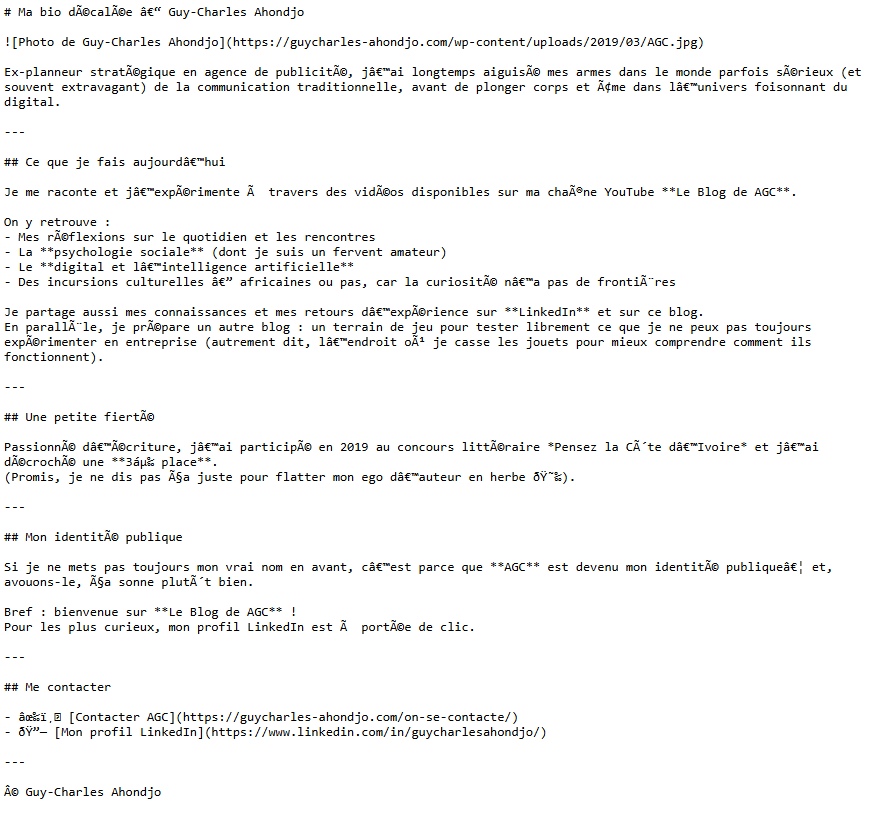
J’ai suivi la procédure partiellement : j’ai ajouté 6 fichiers, dont /llms.txt, /llms-full.md et 4 articles que j’apprécie. C’est à ce moment que j’ai remarqué qu’en créant une page avec l’extension .md, celle-ci remplaçait la page web existante. En effet, une version Markdown avec le même nom prend la place de la page originale. Comme les pages en .md posaient des problèmes d’affichage et d’expérience utilisateur, j’ai renommé mes fichiers en ajoutant -llm.md, par exemple : https://guycharles-ahondjo.com/ma-bio-decalee-llm.md. J’avais ainsi 2 pages pour chaque article: une page en html et une page en markdown.
Voici un exemple pour mieux comprendre mon explication :
Ma page web en HTML :

Voici la version de la page en markdown .md. Vous constatez avec moi que d’un point de vue expérience utilisateur, cette page ci-dessous ne convient pas.
Le dernier point que plusieurs ont déjà relévé et avec lequel je veux finir, c’est le fait que malgré tout ce que j’ai fait, je n’ai recensé aucun hit d’un LLM. Chaque jour, je regardais mes fichiers logs en espérant l’exploration de mon fichier llms.txt mais rien. Aucune page .md non plus n’a été explorée.
Qu’est ce qu’on peut retenir de tous ces tests ?
Pendant presque 2 mois, je me suis attelé à faire ces tests et à ce jour, je n’ai rien constaté de particulier: aucun LLM n’est venu régulièrement sur mes pages en html donc je peux dire que ça ne booste pas les visites des pages web présentes dans le fichier llms.txt. Je n’ai reçu aucun hit sur les pages en markdow et aucun hit sur le fichier llms.txt.
Tous mes tests n’ont donc abouti à rien de concret. Je peux dire que pour l’instant, le fichier llms.txt et les fichiers .md ne servent à rien!! Peut-être que dans les semaines ou mois à venir, il y aura des changements mais pour l’instant, ceux qui pensent que ce fichier ne ser à rien n’ont pas tort surtout que la procédure de mise en place demande du temps.